About a year ago there was a post about the demise of StackOverflow, the portal used by many techies for solving common (and not so common) issues that arise with the use of technology. n00bs and experts all mixed together with the common goal of solving issues resulting from gaps in (unread) documentation. The platform was already in decline from 2018 onwards, with a nice COVID resurgence, and the launch of ChatGPT resulted in a swift drop to almost zero:
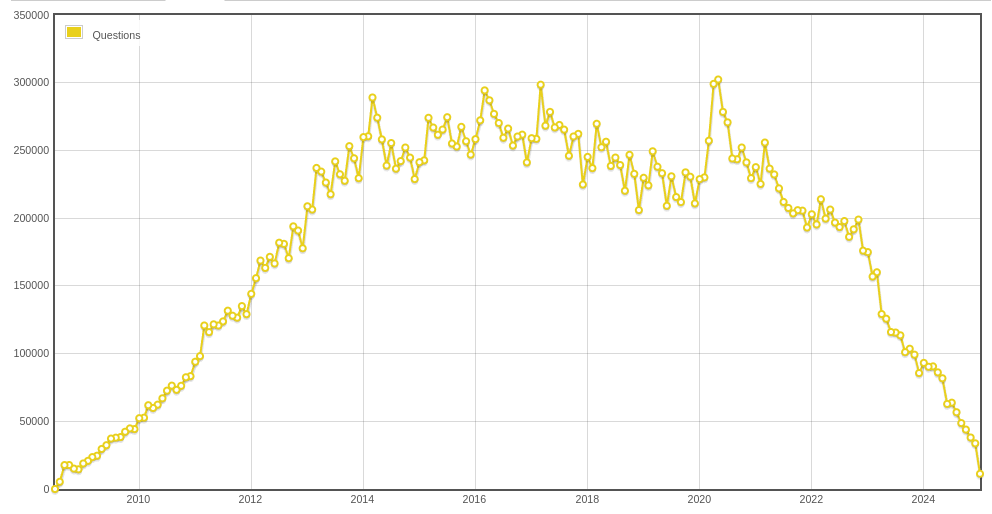
The reason is simple: LLMs give answers in your context, where in the past I needed a number of StackOverflow posts, some blogposts, and the product’s own documentation to solve my issues. LLMs combine all this information for me and spit out good enough answers to make me solve the issues I face. The LLMs are an enormous time and energy saver. However, the future AI can not make use of the content from StackOverflow as the generation of that content has virtually stopped.
I suggested that better documentation, written by the same tools that finished off StackOverflow, might fill the hole of content creation and teach future LLMs how to solve problems. Now, hope is not a strategy and thus, I went on a fact-finding mission. I run about 45 Docker containers divided in about 30 stacks on my home server. I dislike writing documentation just as much as the next person, so I never bothered to document any of it. How nice would it be to have an LLM write it for me?
Recently, I have subscribed to Claude.ai and they have an integration with Chrome/Edge that might do the trick. So I navigated to my DocMost wiki and fed it my infrastructure Docker Compose files (think reverse proxy, IAM, Redis, DB’s etc.). In no time it spit out some descriptions of the stack. Nothing too fancy okayish content. However, when I asked it to create a Mermaid diagram is when I saw the real magic happen. It really understood how everything worked together and created a fine diagram.
As it looked really promising I then asked it to generate some content around individual Docker stacks, and list dependencies, and how to reach the actual apps. It again created beautiful mermaid context diagrams, showing how it worked together with other Docker containers. It horribly, struggled when I asked it to create links under the addresses where apps were reachable. It completely died on me when I asked it to create a summary of all the used ports on the Docker host in one table. As the generation slowed down, I tried spinning up a second instance and have two session generating content, but the second one gave up a lot faster than number one. It was just not as dedicated and determined as the first one, and quite frankly, highly disappointing.
Learning points
- Claude was not strong in determining what is important to document, I had to direct it on what to focus on.
- Diagramming using code was always my favorite, and obviously, Claude feels the same way. The Mermaid diagrams were brilliantly done.
- Accessibility for non-MCP interfaces is really important (DocMost fails in that regard), Claude for Chrome/Edge was burning through tokens (usage limits) faster than I have ever seen it do before (I use the Max plan), and still failed to select text in a table to add a simple hyperlink. It was generating and analyzing screenshot after screenshot, trying to select text and add rows to existing tables.

Conclusion
My experience in solving issues using LLMs that arise from using :latest versions (and auto updating using Watchtower) is that I find myself consulting release notes again. This is where LLMs can really help with writing comprehensive documentation, but not without proper supervision. I think, therefore, there is still some space for a StackOverflow type site, but expect little ‘in-person’ views and lots of LLM/agents looking around to find answers to questions. The big question is going to be: What will be the business model that will float these websites? As the eyeballs of consumers are unlikely to return …
Next steps:
Install Notion as a Wiki, it has native MCP, and thus should be much easier for Claude to communicate with.