Author Archives: admin

Howto publish folders from SDL Tridion

In the Tridion cms content is being stored in folders. The folders are similar to folders in file systems, they contain both subfolders and components. However if you wish to publish the content of an entire folder you will have to traverse all subfolders yourself in order to select and publish the components manually. Not exactly a job for volunteers.

Fortunately there is something called the Tridion API which allows you to write a (power)tool which takes care of traversing a folder hierarchy and republishing all the content in it. This will reduce the effort of republishing an entire folder to an acceptable level and give any script kid a huge sense of accomplishment.

Alas a tool like this is not very friendly to the users of the Tridion cms. They will ask why it is impossible to publish a folder in the same manner they can publish a structure group. The answer to this question is unknown to me at this point in time. Perhaps one of the Tridion employees reading this blog can enlighten me on this subject (and approve my comments on ideas.sdltridion.com). Continue reading

Publish XML or HTML from Tridion?

I created a small evaluation in order to make a substantiated choice between publishing XML or HTML from Tridion. I already assume that you made the choice between static and dynamic publishing Perhaps it will be of interest to someone:

XML HTML
Separating content and presentation / Re-usability of data.
Since the web application completely determines how or which parts of the XML content is presented, the same content can easily be displayed in different ways.
+
Tridion publishing Performance.
When publishing XML content, Tridion only needs to render one Component Presentation which will take less time then rendering multiple Component Presentations.
+
Maintenance and extension of Component Templates.
Your templates in Tridion will be simpler and thus easier to maintain. The complexity is transferred to the web application which is much easier to main then Tridion templates (try debugging or refactoring your code in Tridion).
+
Minimizing CMS development dependencies
Changes in the HTML templates will not result into changes of the CMS template code.
+
Presentation performance.
Rendering the XML into HTML on the presentation server will use more resources then displaying plain HTML.
+
Complexity of the web application
The web application will be partially responsible for rendering the content.
+
Grand total +

SDL Tridion Dynamic component templates vs static Rendering

Tridion has two main methods for publishing information to websites:

  1. Publishing chunks of content to the Tridion broker
  2. Publishing whole pages to the file system.

Both publishing strategies have already been explained in previous posts. However the fundamental differences between both strategies deserves some additional attention.

Publishing chunks of content (dynamic)

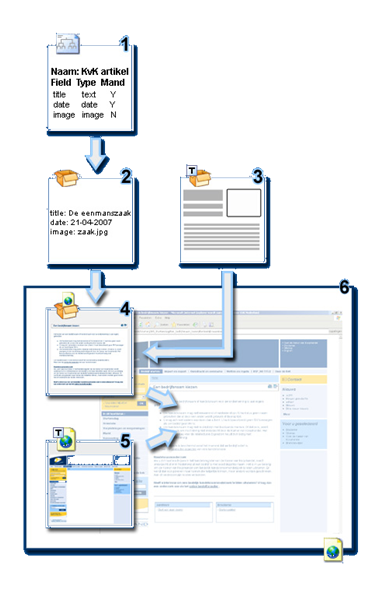
In tridion chunks of content are called component presentations. For this publishing strategy the Tridion rendering tree is traversed until step 4. The result of the rendering is a chunk of XHTML/XML/plain text/ etc. which is subsequently published to the broker DB on the presentation server.

On the presentation server the broker DB will be queried by a website based on ASP, ASP .NET or Java which will use the pre rendered content to create a fully rendered page for the visitors.

Publishing whole pages (static)

In this publishing strategy the full Tridion rendering tree is executed. The result of which can be a file of any type, but usually has one of the following extensions: ASP, JSP, HTML, CSS, XML etc. To get the required results you will need to implement both Component Templates and Page Templates.

Which one to choose?

I recommend the dynamic approach. The static model is quickly becoming obsolete in an era of monthly  website updates and personalization at the top of everybody’s wish list.

A good illustration of why the static model is useless is an update we recently made to the navigation and layout of a website based on the static model (and NO it was not created by me or one of my colleagues). When you make changes to the templating in the static model in Tridion you will need to re-render all of the pages which make use of these templates. In this particular case there were over 2500 pages in the top publication which was blueprinted over 10 times and each blueprint contained an average of 500 local pages.

I needed to explain to the client on several occasions that the go-live was a ‘process’ which would take the better part of 3 days and three nights. The re-rendering of 30K pages would take approximately 60 hours. During this period the website would slowly go from the old look and feel to the new.

Feel free to share your views on this subject in the comments …
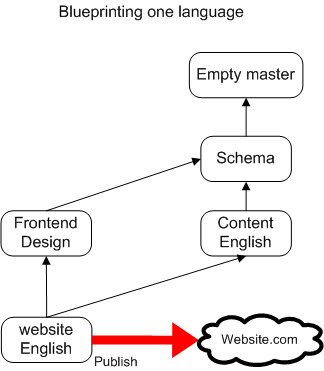
SDL Tridion blueprinting for multilingual websites

Extending your online reach by targeting local audiences in their own language without compromising global brand consistency. This is what Tridion blueprinting is all about:

  • Effectively managing your global message and allow local content editors to adapt and extend that message to incorporate cultural differences and local messages. This will maximize your impact on local markets and still keep the costs manageable.
  • It enables reuse of web applications, cms templating and web design, for each sub site you create. This shortens the time to market for a new website considerably. A good example is the Equens Merger where 6 websites were created in record time.
  • Content can be reused over different websites and channels. There are however some limitations to reusing content in Tridion which need to be considered when creating a Tridion blueprint (todo write about limitations).

In my previous article I showed an elementary blueprint which contained only one language and one website. The picture below shows what the blueprint will look like when an additional language is added.

Continue reading

SDL Tridion Publishing queue

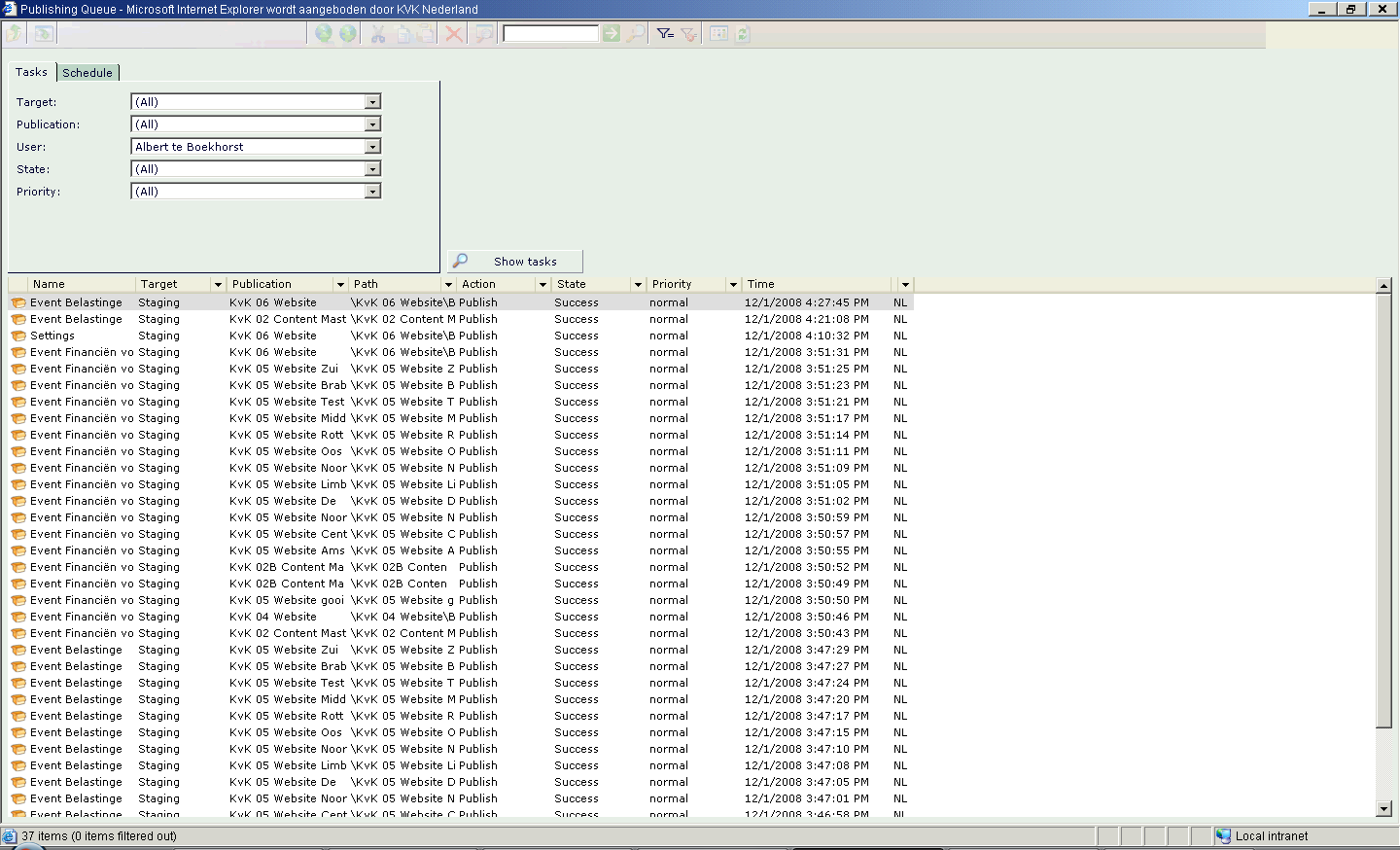
Tridion uses a transactional publishing architecture which enables it to publish content to different websites or channels. To publish your content to a website or channel you specify a publish transaction which includes the publishing target and a date (and some advanced options). The publish transaction will then be placed in the publishing queue where the editors cant track the progress.
The interface enables users to publish their content to one or more predefined publishing targets. A publishing target can be a specific website or any other specific channel. If the user chooses more then one target to publish to, then the system will define a different publish transaction for each of these targets.

During the publish transaction the following happens:

  1. The content is retrieved from the content manager data store.
  2. The content is rendered using the appropriate component templates and page templates.
  3. The rendered content is sent to the Tridion deployer on the presentation server.
  4. If the first three steps succeed the CMS registers that the content is published to the specified target.

If the transaction fails for any reason this will show up in the publishing queue. A nice new feature in 5.3 is that double clicking on the “failed” tag will show you the actual error message that was written to the error log.

Unfortunately 5.3 also has a “bug” fix. As you might have noticed in my Tridion blueprinting article the content is not published from the publication where it was created. Usually it is published in one of the child publications. In previous versions (5.1) it was possible to publish the content directly from the parent publication. Now we have to add the parent publication to the publication target where the child is supposed to publish to. Not very logical and it adds a transaction to the publishing queue and subsequently slows down the publishing queue.

One common problem in Tridion implementations are “slow” publishing queues. The queue becomes “slow” when the publishing process is unable to handle all the publish transactions. This will frustrate the editors as they will need to wait longer for their content to show up on the website. I have identified the following reasons for that contribute to this problem:

  1. Rendering full pages can easily take up to 5 seconds. Which I think is an extraordinary long time for executing a few templates (simple programs). This becomes a problem when you have a lot of editors publishing content at the same time. Or when you need to republish your entire site (I have seen one example where it took 2 multi-core publishing servers 3 days).
  2. Rendering the sitemap through the Tridion API takes up a lot of resources. Consider using the rendering strategy from my article about fast sitemap generation in Tridion.
  3. Using SiteEdit in combination with automatic publishing. A lot of implementations use the Tridion event system to auto publish content to the staging environment on a component save action. SiteEdit saves a component regardless whether there are changes to the component or not. In doing so it will trigger a publish transaction every time an editor visits a page and has SiteEdit enabled on a staging website.

The solution to speed up the publishing process is by adding dedicated publishing servers to your Tridion setup. The real solution, in my opinion, can be found in speeding up the rendering process. I think Tridion should look into this.

SDL Tridion sitemap/navigation rendering < 5s

Most websites use some form of sitemap xml for rendering the navigation blocks. In Tridion implementations this sitemap is usually rendered from the folder structure created by the content editors. The established way of doing this is by creating a component template which calls the Tridion API repeatedly and traverses the folder tree. Unfortunately opening a lot of folders and components through the Tridion API is a time and resource consuming activity.

Traffic jam in Tridion publishing queu

A traffic jam might occur in the Tridion publishing queue if you use the API for rendering the sitemap.

The method of traversing the tree will work fine if you have just one website in Tridion and not too many folders and components which need processing. Unfortunately most companies purchasing Tridion host more then one small website. Typical Tridion clients will manage the content of up to 50 websites in Tridion with thousands of components and folders per website. Most of these implementations suffer from a performance penalty in publishing content as a result of slow sitemap rendering.

In one implementation we needed to generate 13 sitemaps with a rendering time of 10-12 minutes each. With both a staging and live website (a typical tridion production setup) needing a new sitemap at least once an hour this meant the rendering of 26 sitemaps per hour. Needless to say that this would put a huge strain on rendering resources.

The solution to this problem is in NOT using the Tridion API for rendering the sitemap. In the case mentioned above I created a program which queried the filesystem of the presentation server. The program is capable of rendering the sitemap in well under 5 seconds. Which is roughly 100 times faster then the alternative. On the staging server the program runs every minute to give the content editors a near realtime experience. On the live server it is scheduled to run every 5 minutes.

The drawback of taking resources from the presentation server can be remedied by running the program on the lowest possible priority. When running in low priority the program will only use the idle time of the presentation server for rendering the sitemaps.

Other options:

  • Querying the Tridion broker DB. To do this you need to make sure that every component knows its parent. This option can be used for websites using a dynamic publishing strategy.
  • Maintaining the sitemap via the Tridion event system (not recommended, I will go into detail on the event system some other time).

SDL Tridion Blueprinting elementary

Blueprinting is the name Tridion uses for creating a hierarchy of publications. Every publication in the hierarchy contains a specific website building block (XML schemas,content, templates, layout, applications). Each child publication inherits the building blocks of its parent(s). The publications lowest in the hierarchy are the publications where content, layout and applications come together and form a website. The building blocks inherited from a parent publication are read-only unless you “localize” (i.e create a local copy) them.

Choosing the right blueprint for your organization is critical to the success of a Tridion implementation. If you fail to get the blueprint right then future changes to it will prove to be very hard and the usability of the system very low. Even the initial implementation of a simple, one language and one channel, website will be a daunting undertaking and will remain a challenge during the entire product life cycle. Continue reading

Launch date SDL Tridion Community

The proposed launch date for the Tridion Building Blocks Exchange website is set for december 2008 (join the SDL Tridion R5 group on linkedin). The goal of the website will be the exchange of the newly introduced compound templates. The compound templates are introduced in Tridion 5.3 and are .NET based. They are a big step forward from the old VB, Java and (my favorite) XSLT Component templates and page templates, because for the first time it will be possible to debug by using an actual debugger. Finally! 🙂

I hope they will also publish some kind of roadmap and get a discussion going on the future of the product. In any case I hope to meet you there and share a few ideas and perhaps, who knows, even some templates.

SDL Tridion is about to launch the BBX community. This Building Blocks Exchange Web site gives experts the stage to share their great work such as reusable tools, Modular Templates, scripts and more. And of course to download and use for your own Web sites. The exchange Web site is scheduled for launch before Christmas.

Sources:

SDL Tridion Structure Group

A structure group is a container for pages and sub structure groups. It is similar to a folder in the file system. On the presentation server a Structure Group corresponds with an actual folder on the file system. It is possible to add metadata to eacht folder.

The difference between a folder and a structure group is that a folder contains components and a structure group contains pages. The fact that a file system folder in the structure of the website corresponds with a Tridion structure group, and not a Tridion folder, is somewhat confusing. Continue reading

SDL Tridion Component Linking

A component link is a reference within the content, or meta data of a component (A), to another component(B). The link in component A is a reference based on the unique ID from component B.

On the presentation server this reference will be translated to  the URL where the rendered content from component B can be found. If component B is not published you can choose two outcomes:

  • The anchor text will be presented as normal text
  • The anchor text is not shown.

Goal: To minimize effort in managing internal links. The advantage is that you will never have broken internal links on your website. Continue reading